
PlayinMatch · Android and iOS
PlayinMatch App Download — One Official Install File That Covers Android and iOS
Two builds, one account. PlayinMatch carries an Android entry and an iOS entry in its own footer, with a QR code sitting beside them, and whichever route you take you end up signed into the same verified ID you were already using in a phone browser.
A word on the com in playinmatch com mobile download, because it decides where you get the file. That is an address, nothing more. India blocks these domains often, so the page you downloaded from in one month can be unreachable the next, while the ID behind it and the balance on it stay untouched — the PlayinMatch board and its shifting address is a longer story than this page needs.
Before the Install: Which PlayinMatch ID Are You Signing In With?
Where the Official PlayinMatch App Download Actually Comes From
Not the Play Store. Search there and you get nothing belonging to this brand, because apps in this category are not distributed through the store to Indian users — so the file lives on the platform, and the footer is where the platform points you.
Scroll to the bottom of the board and there are two entries, Android and iOS, with a QR code next to them. Point a camera at the code and the download address opens on your phone. That is the whole official route, and it is worth memorising, because every messy PlayinMatch install story starts with somebody skipping it.
- The footer QR
- Fastest path when you are reading the board on a laptop and want the app on your phone. Camera, code, download page. No typing an address that you will mistype.
- The desk message
- Better when the board itself will not open for you. Ask which PlayinMatch address is live, take the download link from the reply, install from that.
- Everything else
- APK mirror sites, forum attachments, a file somebody forwarded on a group. Those are the ones that go wrong, and they go wrong quietly rather than loudly.
Here is the reason that third row matters more than it sounds. A repackaged PlayinMatch APK does not announce itself. It installs, it shows a login screen, and it may even accept your username — and then you have handed credentials to a file of unknown parentage. The board you should have reached is fine. Your account is the thing that took the hit. Take the file from the platform or from our desk, and that entire class of problem disappears.
One more thing about the QR, since people assume it is decorative. It is not a marketing graphic; it resolves to the current download page, which means it changes when the address changes. A QR you screenshotted in June is as stale as a bookmark from June. Rescan it off a board that is actually loading today, or just ask us. Either way, the PlayinMatch install you end up with should have arrived in the last few minutes rather than the last few months.
PlayinMatch App Download for Android, Verified Step by Step
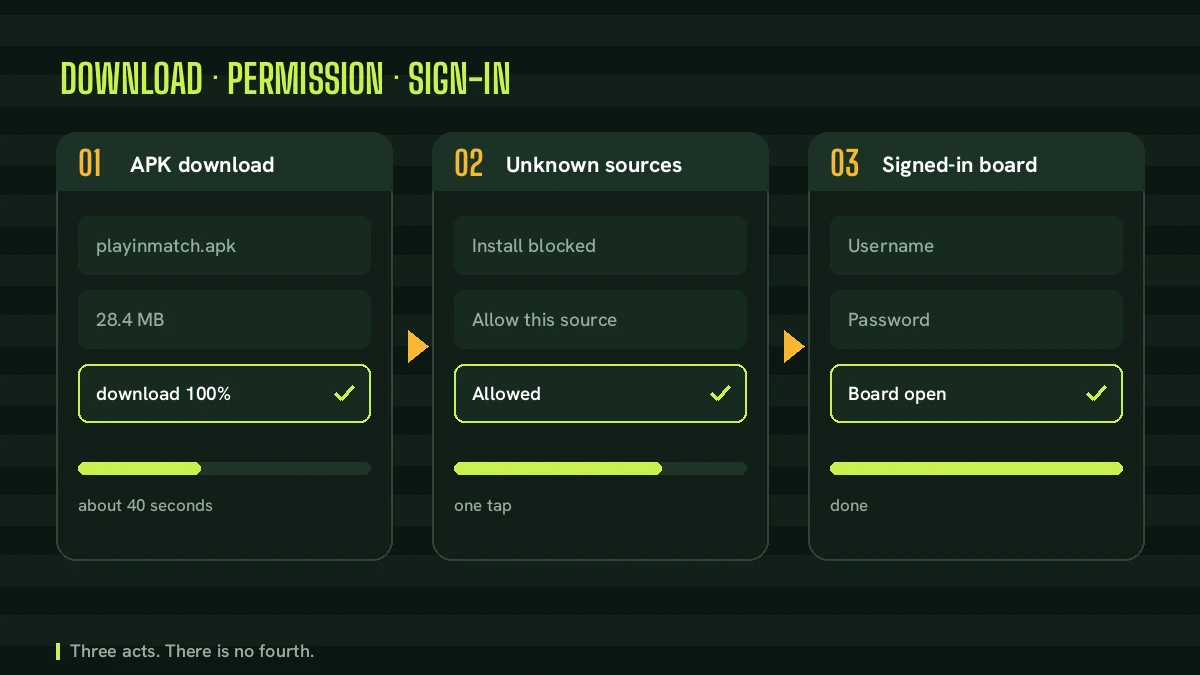
Install progress · Android
- 01Address from desk or QR
- 02File saves to Downloads
- 03Browser warns on the type
- 04Allow this one source
- 05Open and sign in
Five taps, roughly, and two of them are warnings you have to read rather than swipe away. The Android side of PlayinMatch is a plain APK, which is why it behaves differently from anything you have installed off a store, and why the phone gets suspicious partway through. That suspicion is the phone doing its job.
- Open the current PlayinMatch download address on the phone itself. Not on the laptop, not on a second handset — you cannot sideload from one device to another without extra steps nobody needs.
- Let the download run to the end before you touch anything. It arrives in Downloads with an apk extension on the end, and if the size stops climbing while the notification never reads complete, that half-file is already the reason the install will refuse two steps later.
- Open it straight from the notification. What comes next is a halt rather than a failure: the phone wants to know whether the browser that fetched the file may act as an installer. Say yes for that browser and for nothing else.
- Let Play Protect scan if it offers to. It takes a moment and costs you nothing. If it flags the file, do not argue with it; go back and check where you got the file from.
- Install, open, and sign in with the PlayinMatch username and password you already hold. Nothing gets created here. You are attaching an icon to an account that exists.
That should take a couple of minutes on a decent connection. If it is taking fifteen, the problem is almost never the PlayinMatch APK itself — it is a phone with no room on it, or a download that stalled at ninety percent and never told you. Both have fixes further down this page.
People ask whether the PlayinMatch app for android needs anything special about the handset. No, not really. If the phone runs a current browser and has a few hundred megabytes free, it runs the app. An exchange board is mostly text, numbers and a refresh loop; it is not a game engine. Older handsets struggle with the live screens before they struggle with the install.
What the Unknown Sources Prompt Asks Before an Official PlayinMatch APK Installs
This is the screen that stops most people, and it is the screen worth understanding rather than tapping through. Android does not have a single global unknown sources switch any more. Since Android 8 the permission is per app, and the app it is asking about is the one that handed it the file.
So the prompt says something close to: for your protection, your phone is not allowed to install unknown apps from this source. Underneath there is a settings shortcut. Follow it and you land on a page with your browser named at the top and one toggle. Turn that on, back out, tap the file again, and the install proceeds.
What that toggle does is narrower than it sounds. You have not opened the phone to anything. You have said this one browser may hand the installer a file, and that permission sits in Settings, Apps, Special access, Install unknown apps — where you can read it back later and switch it off. A lot of people do switch it off after a PlayinMatch install, and that is a perfectly sensible habit. The app already installed; revoking the browser permission does not touch it.
If the prompt never appears at all, one of two things happened. Either the browser already had the permission from an earlier sideload, or the download did not finish and there is nothing to install. Check Downloads before concluding anything about the PlayinMatch install.
Some manufacturers dress this up more than others. A few Indian-market skins add a second confirmation with a countdown on the button, which feels like being told off. Read it, wait the few seconds, continue. It is the same permission underneath, just louder.
PlayinMatch App for iOS: the Verified Home-Screen Route
iPhones do not take APK files. That sentence saves a surprising amount of time, because a good share of the playinmatch download apk searches come from people holding an iPhone and wondering why the file will not open.
PlayinMatch lists iOS in the footer alongside Android, and on most handsts what that resolves to in practice is the home-screen route rather than a store install. Open the live board in Safari. Tap Share, the square with the arrow at the bottom of the screen. Scroll the sheet down to Add to Home Screen, name it, done. An icon appears on your home screen and the board opens from it without address bar or browser tabs wrapped around it.
Is that a real app? Depends what you want from the word. It behaves like one — full screen, own icon, launches from the same place every other app launches from. It also updates itself without you doing anything, which the Android build cannot claim. What it does not do is sit in an App Store listing, and it never will, for the same caegory reason the Android side is not in the Play Store.
Do the Add to Home Screen step from Safari. Chrome on iOS has a version of it, but the icon it creates behaves less predictably, and re-signing into PlayinMatch afterwards is more of a nuisance than it should be.
The one iPhone habit worth adopting: redo it when the address moves. Your home-screen icon points at whichever PlayinMatch address you pinned. If that address goes dark, the icon opens nothing, and the instinct is to think the app broke. It did not. Delete the icon, open the current address, add it again — thirty seconds, and everything in your account is exactly where you left it because the account was never stored on the phone.
Signing in behaves the same on either handset, and if the sign-in screen is where things are going wrong rather than the install, the PlayinMatch login screen page takes those fields one at a time.
PlayinMatch App Download APK Old Version vs the Latest Official Build
There is real search traffic behind playinmatch app download apk old version, and it is one of the few queries on this whole cluster that deserves a flat do-not in reply.
Think about where an old build can possibly come from. Not the platform — the platform serves the current file and nothing else. So an old version APK arrives from an archive site that scraped a copy at some point, repackaged it, wrapped it in advertising, and has no relationship with PlayinMatch whatsoever. Two problems follow from that, and the second is worse than the first.
- An old build points at an old address. If that address has since been blocked, the app opens to a blank screen or a spinner that never resolves, and you spend an evening convinced the platform is down.
- Nobody checked the file. A store verifies signatures; an archive site verifies nothing. You are trusting a stranger with the login you use for money. That is the entire objection, and it does not get smaller because the file installed cleanly.
The playinmatch app download apk latest version query is the same question asked from the useful end, and the answer there is short. The newest file is whatever the current download page is serving right now. There is no version list to compare against, no changelog to read, nothing to match. Download it today and you have the latest by definition.
How do you tell you are on a current PlayinMatch build? Open the app and open the board in a browser side by side. Same sections, same screens, same balance — you are fine. If the app is showing you something noticeably older than the browser board, or refusing to load sections that work fine in Chrome, reinstall from the current address rather than trying to fix it. An APK does not repair itself.
And if an update prompt appears inside the app, take it. That is the one update route that comes from the platform rather than from a stranger, which makes it the only one worth trusting.
PlayinMatch Live App or the Browser Board on One Verified ID
Both. That is genuinely the answer most accounts land on after a fortnight, and there is no cost to running both because they are the same account looked at through two windows.
- What the PlayinMatch live app gives you
- An icon instead of a bookmark, a session that tends to stay signed in longer, and no address bar eating the top of a small screen. Two fewer taps to the market you were watching.
- What the browser board gives you
- Nothing to install, nothing to update, and it works on a borrowed laptop or a second phone the moment you sign in. Also the fallback when an install refuses to behave.
- What they share
- One username, one password, one balance. A position opened in the app is the same position in the browser, because it was never stored on your handset in the first place.
Where the app earns its keep is in-running. A cricket chase moves fast, prices redraw constantly, and the difference between an icon on the home screen and hunting for a tab matters more than it should at the death of an over — the PlayinMatch live cricket board page goes into how the sport screens fill up and when. Instant games are the other case: something like PlayinMatch Aviator runs on round timing, and a browser tab you have to go looking for is a round you missed.
The live table side is a bit different. Evolution dealers and the rest of the floor stream video, which is the one place where signal quality bites harder than interface choice, and the PlayinMatch casino floor page covers what sits on that side of the board. On a weak connection the browser is no worse than the app. On a good one, neither is.
Having run both on the same account for weeks, my read is this: the PlayinMatch app is a convenience, not an upgrade. Nobody gets better prices for installing it. Anyone telling you a particular build unlocks somthing the browser does not is selling you a file you should not open.
When a PlayinMatch Install Fails: the 24x7 Desk Checklist
App not installed. Three words, no explanation, and Android will not tell you which of the four likely causes it means — so run them in order rather than gussing.
Start with the file. A truncated download produces exactly this error, and a download can truncate without the notification ever admitting it. Delete the apk from Downloads, get it again from the current PlayinMatch address, and try once more before touching any settings.
Then storage. Android needs headroom well beyond the size of the file to unpack an install, and a phone sitting at ninety-eight percent full will fail without saying why. Clear a gigabyte. Photos, not apps — you will want the apps.
Third, an older copy of the same app. If a previous PlayinMatch build is still on the handset and the signatures do not match, the new install is refused outright. Uninstall the old icon first, then install fresh. You lose nothing; the account lives on the platform, not on the phone.
Fourth, and this one catches people out, the clock. A handset with the wrong date fails certificate checks on downloads, and the symptom looks nothing like a clock problem. Set date and time to automatic.
If all four are clean and it still refuses, stop and message the desk. Tell us the handset, the Android version and the exact wording on screen. That is usually enough for us to say whether you have a device quirk or a file that never finished arriving, and the desk is reachable around the clock — the PlayinMatch customer care desk page has the contact detail written out.
PlayinMatch Com Mobile Download on a Slow or Crowded Phone
Plenty of the phones this arrives on are not new, and the connection is whatever the tower is giving that evening. Neither is a reason to skip the app, but both change how you should go about the download.
On a weak signal, start the PlayinMatch download when you are not in the middle of anything. A stalled install at the start of a match is worse than no install at all, and a file that half-arrives is the single most common cause of the error in the section above. Wifi if you have it. If you do not, a stationary five minutes beats a moving two.
On a full phone, clear room first rather than after the failure. It is the same advice as the checklist, moved earlier, because doing it in that order saves you the failed attempt entirely.
And while any of that is happening, the browser board is right there. That is the part people forget: you do not have to wait for an install to reach your account. Open the current address, sign in, read the sections, place what you meant to place. The PlayinMatch app download can finish in the background or tomorrow morning — it changes nothing about what your ID can already do tonight.
Last practical note on storage, since it is the one that keeps coming back. Apps like this accumulate cache over weeks. If the app starts feeling sluggish months after a clean install, clear its cache from app settings before you consider reinstalling. Cache, not data — clearing data signs you out, and then you are typing your PlayinMatch password at exactly the moment you did not want to.
People also search
- playinmatch app download apk
- playinmatch apk download link
- playinmatch install kaise kare
- playinmatch app for android mobile
- playinmatch live apk download
- playinmatch app download latest version
- playinmatch com mobile download
- playinmatch apk old version download
- playinmatch app not installing fix
- playinmatch download for iphone
- playinmatch live app login
- playinmatch app update kaise kare
PlayinMatch APK, Install and Live App Searches Answered in One Official Place
- playinmatch app download: the Android file and the iOS home-screen route, both off the platform footer.
- playinmatch app: a home-screen shortcut into an ID you already own.
- playinmatch apk: the Android install file, saved to Downloads before anything installs.
- playinmatch install: five steps, two of which are permission prompts you should read.
- playinmatch download: whichever of the two builds your handset actually accepts.
- playinmatch live app: the in-running case, where an icon beats hunting for a browser tab.
Those six cover most of what arrives here, and the rest are the same intent asked more specifically. Somebody typing playinmatch apk download and somebody typing playinmatch download apk want one thing: the current file, from the platform, not from an archive. The playinmatch app for android queries are handset queries in disgise, and the answer is that any phone running a current browser runs it. A playinmatch live apk search is usually about in-running speed rather than a different file, because there is no separate live build. And playinmatch com mobile download is an address question wearing an install question as a hat — the com part is the door, and doors move.
| What gets typed | What it is really asking |
|---|---|
| playinmatch app download apk | Give me the Android file and tell me where it is safe to get it. |
| playinmatch app download apk latest version | Am I on the current build, and how would I even know. |
| playinmatch app download apk old version | Usually a broken install. The fix is the new file, not an older one. |
| playinmatch app download for android | Will it run on this handset, and what does the phone ask me. |
| playinmatch com mobile download | Which address is live today, so the download page actually opens. |
| playinmatch live apk | Can I follow an in-running market faster than in a browser tab. |
PlayinMatch APK and Install Questions From the 24x7 Desk Queue
3.1How do I download the PlayinMatch app?
From the platform itself, not from a store listing. The footer of the board carries the Android and iOS entries with a QR code beside them, and our desk sends the address that is live on the day you ask. Sign in afterwards with the ID you already hold.
3.2Is there a PlayinMatch APK for Android?
Yes, and it is the only file involved on Android. There is no store listing behind it and there will not be one, so the PlayinMatch APK reaches you from the platform footer or from our desk. One file, one install, and the ID you sign in with afterwards is the one you already hold.
3.3Does the PlayinMatch app work on iPhone?
iOS is listed alongside Android in the PlayinMatch footer. On most iPhones the working route is Safari, then Share, then Add to Home Screen, which pins the board as an icon that opens without browser bars. Same login, same balance, no APK involved.
3.4Why does my phone block the PlayinMatch APK install?
Because Android blocks installs from any source it has not been told to trust. The prompt names the app doing the installing, usually your browser, and you allow that one app. Play Protect may also ask to scan the file first, which is normal for any APK.
3.5Should I install an old version of the PlayinMatch APK?
No. An old version APK comes from a mirror site rather than the platform, and older builds point at an address that may already be blocked, so the app opens on a blank screen. Take the current file from the source and skip the archive sites entirely.
3.6Does the PlayinMatch app use the same balance as the browser?
Yes, exactly the same figure. The app is a window onto an account that lives on the platform rather than on your handset, so signing in shows you the balance you left on the browser board. Installing changes nothing about the username, the password or the money.
3.7What do I do if the PlayinMatch install fails halfway?
Delete the part-downloaded file and start again on a stable connection. App not installed usually means a truncated download, a full storage partition, or an older copy of the same app still sitting on the phone. Our desk answers install questions around the clock.